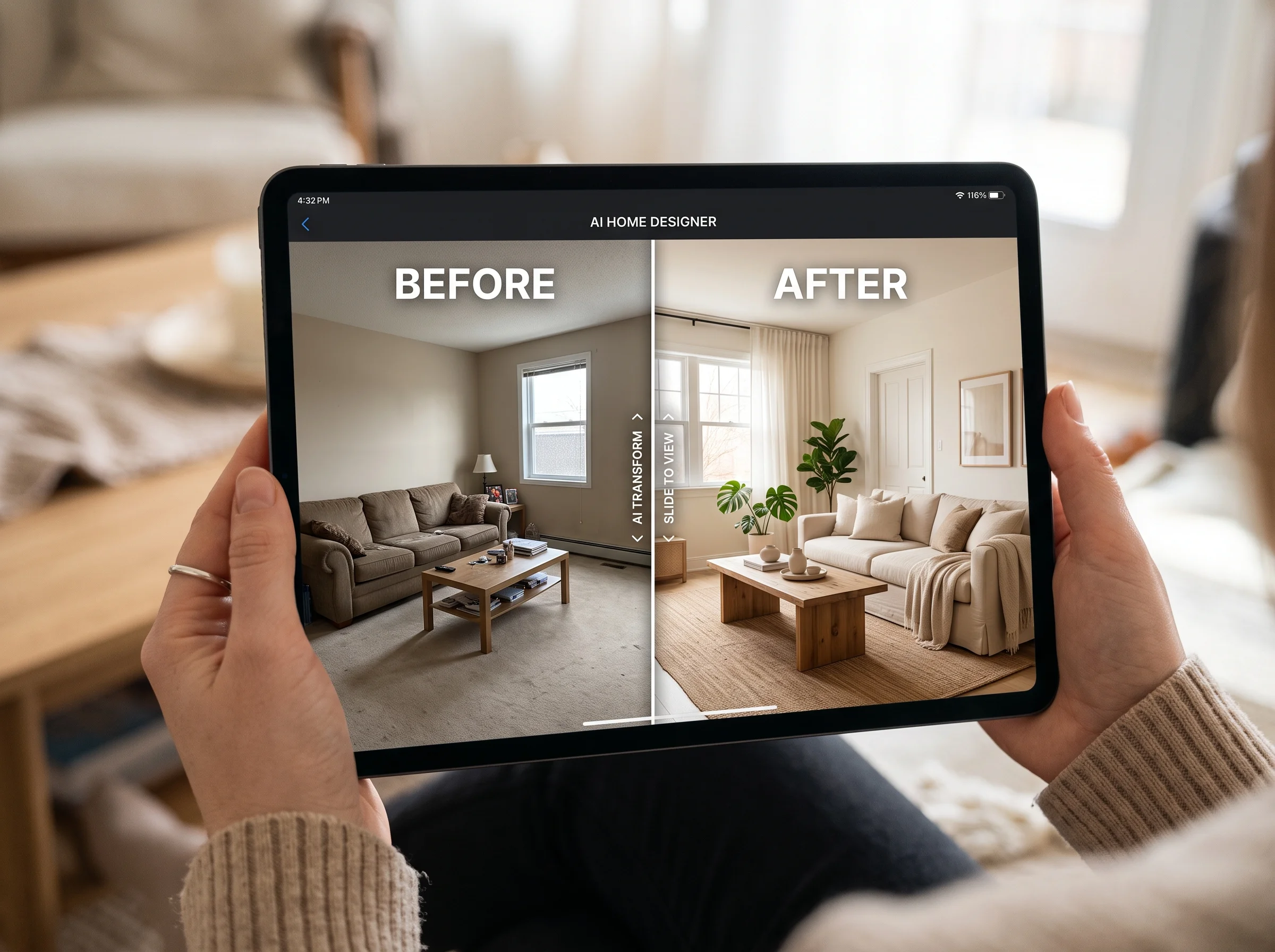
We took a single ordinary living room — a photo anyone could have taken with their phone — and let AI redesign it eight different ways. Scandinavian, industrial, mid-century, warm minimalist, dark and moody, coastal, traditional, and Japandi. Same room, same windows, same afternoon light, eight completely different rooms out the other end. This article is the honest report of what came back: what the AI absolutely nailed, what it couldn't do no matter how we prompted it, and how to actually use the results to make decisions with real money attached.
The short version: AI is extraordinary at showing you what a space could look like, and useless at telling you what it would cost to build or whether the wall you want to remove is holding up your roof. Knowing which side of that line each decision falls on is the whole game.
The Actual Experience
The mechanics are simpler than most people expect. You upload a photo of your room. You describe or select a style. Thirty seconds later you're looking at your room — recognizably yours, same layout, same proportions — transformed into that style. You don't build a model, you don't measure anything, you don't wait for a studio. You look at a photorealistic version of your space and react to it.
The reaction is the point. Most people feel something immediate the first time they see it: relief, or surprise, or a small "oh, no, not that." That instant gut response is information you can't get from a Pinterest board of other people's rooms, because this is your room. The couch is where your couch is. The window throws light the way your window does.
What AI Nails
Across all eight styles, a clear pattern emerged in what the AI handled beautifully.
Color palettes. This is where AI is close to flawless. It understands how a palette reads in a real room — how a deep green reads against warm wood, how an all-white scheme can feel either serene or clinical depending on the accents. Testing color is arguably the single most valuable thing it does.
Furniture style and scale. The AI consistently placed furniture that fit the room's proportions and the chosen aesthetic. A low mid-century sofa in the mid-century render, a chunky sectional in the coastal one. It reads the room's size and picks pieces that belong.
Overall aesthetic feel. The hardest thing to communicate in words — the mood of a style — is exactly what AI conveys best. The Japandi render felt calm and the industrial one felt edgy without either being a caricature.
Lighting mood. Warm lamplight versus cool daylight, bright and airy versus dim and cozy — the AI shifts the emotional temperature of the room convincingly, which matters enormously because lighting is what a room actually feels like at 8pm.
Wall treatments and flooring. Paneling, exposed brick, plaster, wallpaper; oak planks, herringbone, polished concrete, rugs. The AI swaps these confidently and shows you how a floor or wall change transforms everything above it.
"AI is extraordinary at showing you what a space could look like, and useless at telling you what it would cost to build. Knowing which side each decision falls on is the whole game."
What AI Can't Do
Being honest about the limits is what makes the tool actually useful, because it tells you exactly when to stop trusting the image and pick up the phone.
It doesn't know your exact dimensions. The AI infers proportions from the photo, but it does not know your room is 11 feet 4 inches wide. If you're buying a specific sofa, you still have to measure. The render shows you a sofa like the one you want in a space like yours — it does not certify that a particular 94-inch sofa will physically fit past your doorway.
It doesn't understand traffic flow or what's behind walls. A layout can look perfect and still block the path to the kitchen, or place a couch where a heating vent lives. And the AI cannot see plumbing, wiring, ductwork, or which walls are load-bearing. If a render implies moving a wall, that's a conversation for a professional, not a prompt.
It doesn't account for acoustics. A room full of hard surfaces looks stunning and echoes like a gymnasium. The image is silent; the real room is not.
It doesn't source the actual products. The gorgeous armchair in the render is a synthesis, not a SKU. The AI won't hand you a shopping link or tell you it's in stock. It shows you a target to shop toward, which is genuinely useful — but the sourcing is on you or a designer.
It doesn't manage a renovation. No AI is going to sequence your contractors, hold the tile guy accountable, or be there when the delivery arrives damaged. Execution is a human job.
Where AI Is Genuinely Decisive
Now the useful part. There are specific, common decisions where seeing your actual room in a render doesn't just help — it settles the question:
Choosing between two sofa colors before buying. You're torn between the oatmeal and the forest green. Render both in your room, with your light and your walls. One of them will look right immediately, and you'll have saved yourself a return, a restocking fee, and three weeks of doubt.
Testing a bold paint color before committing. Deep navy on the accent wall sounds brave and might look either incredible or oppressive. Seeing it in your actual room, at your actual scale, turns a gamble into an informed choice for the price of thirty seconds instead of a weekend and two coats of primer.
Showing a partner what you're picturing. The oldest fight in home design is two people using the same words for different images. A render ends it. You stop arguing about "cozy" and start pointing at a picture you can both see.
Exploring five directions in an afternoon. Before AI, seeing your room in five styles meant weeks and thousands of dollars through a designer's rendering pipeline. Now it's an afternoon. That speed changes how thoroughly you explore before you commit — and thorough exploration is what produces rooms people actually love.
Practical Workflow Tips
The quality of what you get back depends a lot on how you use the tool. Three things make the biggest difference.
Take good reference photos. Shoot in daylight, get the whole room in frame, hold the camera level, and clear obvious clutter. The AI works from what it can see; a dim, cluttered, tilted photo produces weaker results than a clean, well-lit one. This is the single highest-leverage thing you can do.
Try multiple style descriptions. Don't stop at the first render you like. Run the same room through several directions, and also run variations within a direction — "warm minimalist with a green accent" versus "warm minimalist with terracotta." The cost of another attempt is trivial, and the comparison is where the insight lives.
Use results as decision-making tools, not final blueprints. The render is not a construction document. It's the best possible answer to "what would this look like?" — which is exactly the question you need answered before spending money on paint, furniture, or a designer's exploration hours. Treat it as a way to choose confidently, then measure, source, and (where needed) bring in a professional to execute.
The Honest Verdict
Letting an AI design your room is not magic and it's not a gimmick. It's a visualization tool that happens to be shockingly good at the one thing homeowners want most and can least easily get: seeing their actual space in a style they're considering, before they commit. It will not measure your doorway, source your armchair, or manage your contractor. But for the entire category of decisions that are really about choosing — which color, which style, which mood — it turns weeks of uncertainty into an afternoon of clarity. Use it for what it's great at, hand off the physical work to humans, and you'll make better decisions with less money at risk.