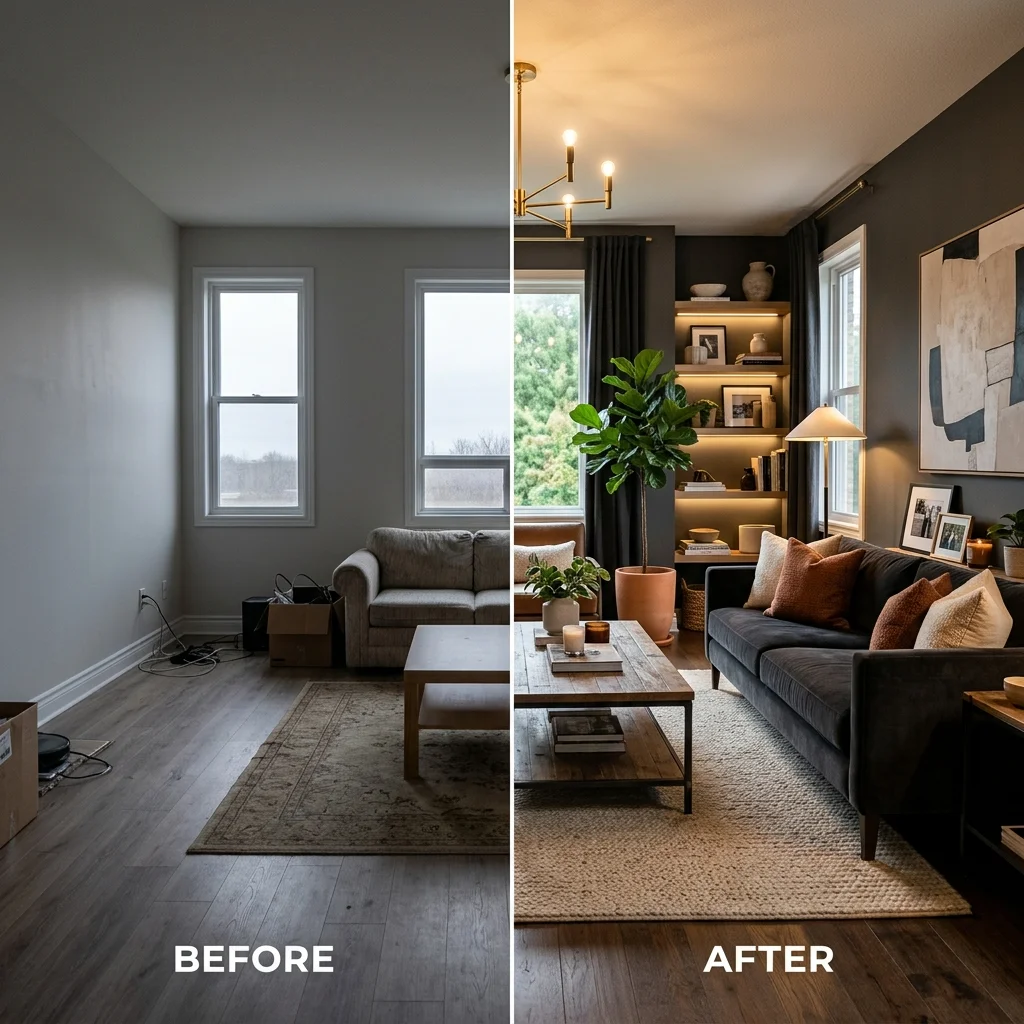
Virtual room staging is the digital furnishing of an empty real estate listing using software instead of physical furniture, props, and movers. AI virtual staging takes that idea further: instead of compositing 3D-rendered furniture into a photo by hand, you upload a single photograph of an empty room and a generative model produces a photorealistic, fully furnished image in under a minute. For listing agents, Airbnb hosts, landlords with vacant units, and FSBO sellers, the math is hard to ignore. A traditional stager charges $2,000 to $5,000 to dress a three-bedroom home for a six-week listing window. AI virtual staging costs between $5 and $15 per room, finishes in seconds, and lets you A/B test multiple styles before deciding which one to publish on MLS.
This guide is the honest version. We'll cover what virtual staging actually does, what it doesn't, when it works for an MLS listing and when it doesn't, the exact workflow from empty room to listing-ready image, which styles convert browsers into showings, and where the legitimate ethical and disclosure lines sit. By the end you'll know whether AI virtual staging belongs in your listing process, and how to use it without burning credibility.
What Virtual Staging Is — And Why It Matters in Real Estate
Empty rooms are hard for buyers to read. They look smaller than they are because there's nothing to give scale. They look colder than they are because every surface is the same color. And they invite the wrong questions: Will my couch fit? What's that corner for? Is this room actually usable? The National Association of Realtors has reported for years that staged listings sell faster and at higher prices than empty ones — agents who stage routinely cite single-digit to mid-teens percentage premiums and meaningful reductions in days on market.
Traditional staging solves the perception problem with real furniture. A stager walks the property, designs a layout, rents inventory, delivers and arranges everything, photographs the result, and reverses the process at closing. The work is real, the labor is real, and so is the cost. That cost is the problem virtual staging exists to solve.
Traditional Staging vs AI Virtual Staging: The Real Numbers
Traditional staging for a typical three-bedroom home in a mid-sized US market runs $2,000 to $5,000 for the first month and $500 to $800 for each additional month of inventory rental. Luxury markets routinely cross $10,000. The cost is paid by the seller or the listing agent — often out of the agent's marketing budget, which compresses margin on lower-priced homes where traditional staging is uneconomic in the first place.
AI virtual staging inverts this. A single redesigned image of an empty room costs between $5 and $15, depending on the platform and credit tier. A whole home — say, eight rooms photographed and staged — runs $40 to $120 total. There is no inventory, no delivery, no rental period. The output is digital, which means you can re-stage the same room three different ways for the same listing and choose the version that performs best on MLS impressions.
"A traditional staging job that costs $3,500 and three weeks of coordination becomes a $50 afternoon with AI — same eight rooms, three style variations each, ready for MLS upload."
What AI Virtual Staging Actually Does (And What It Doesn't)
Be precise about what's happening under the hood, because the precision matters for ethics and for results. AI virtual staging takes the photograph of your empty room and generates a new photorealistic image of that same room with furniture, art, and decor placed throughout. The walls stay where they are. The windows stay where they are. The flooring is typically preserved. What changes is everything that wasn't there before: sofas, beds, rugs, lamps, plants, artwork, kitchen accessories.
This is different from photographer post-production, which historically meant a graphic designer compositing 3D-rendered furniture into a photo in Photoshop over four to twenty-four hours per image at $30 to $75 per image. AI does the same job in 30 seconds with no human in the loop. The quality gap between the two has closed faster than most agents realize — modern AI staging output is now indistinguishable from human-composited staging in side-by-side blind tests on smartphone screens, which is how 70%+ of buyers view listings.
What it doesn't do: AI virtual staging cannot reliably remove existing furniture from an occupied room and replace it with new furniture for MLS use. Some tools claim to, and the output sometimes looks fine, but the technology is not yet consistent enough to use on a live listing without risking obvious artifacts. Stage empty rooms. Period.
The Quality Question: Is AI Staging Good Enough for MLS?
For empty rooms, in 2026, yes. Modern generative models — Decorb runs on Google's Gemini family — produce output that holds up at full MLS resolution and on print flyers. Materials read correctly. Light direction matches the original photograph. Shadows fall where they should. The furniture has weight.
The remaining tells are subtle: occasionally a chair leg sits a millimeter off the floor plane, or a houseplant has slightly impossible foliage, or a rug pattern doesn't perfectly tile. These are catchable on close inspection by a trained eye but invisible on a phone scroll. Generate two or three variations per room, pick the cleanest one, and you'll publish images that look professionally staged.
Stick to the source-photo rule: if the empty room is well-lit, well-framed, and shot in landscape from a corner, the staging will look professional. If the source photo is dark, blurry, or shot at a strange angle, the staging will inherit those problems. Garbage in, garbage out applies to AI like it does to everything else.
Step-by-Step: From Empty Room to Listing-Ready Image
Here's the entire workflow.
- Photograph the empty room. Use a real camera or a recent smartphone in landscape orientation. Shoot from a corner at hip height so you capture two walls, the full floor, and a strip of ceiling. Turn on every light, open the blinds for daylight, and turn off your flash. Wipe the lens.
- Upload to your AI staging platform. On Decorb, create a new project, drop in your photo, and wait three to five seconds for the geometry to process. Each photo is one project.
- Pick a style preset matched to the market. For most US suburban listings under $750k, choose Contemporary, Transitional, or Scandinavian — they convert best across demographics. For $1M+ urban listings, Contemporary Luxury or Modern Industrial. For coastal markets, Coastal Modern.
- Generate two or three variations. AI staging is cheap enough that you should always generate multiples. Compare them side by side. Pick the one with the cleanest furniture placement and the most flattering scale.
- Download at full resolution. Most MLS systems accept 1920×1080 or higher. Decorb exports at full resolution on paid tiers and at standard resolution on the free tier — enough for online listings but worth upgrading if you're printing flyers.
- Disclose the staging. Add the standard MLS disclosure: "Virtually staged" or "Photo virtually enhanced" in the photo caption or listing notes. This is required by most state real estate commissions and is good practice everywhere else.
Which Staging Styles Sell Best
Staging is not interior design. The goal is not to express a personality — it's to help the buyer mentally move in. That means three style families dominate.
Contemporary — Neutral palettes, clean-lined furniture, mid-tone wood, soft textiles. Reads as new construction even in older homes. Works for nearly every buyer demographic between 25 and 65.
Transitional — A blend of traditional and contemporary. Slightly softer than strict contemporary. Works exceptionally well for family homes in the $400k-$900k range where the buyer pool skews toward thirty- and forty-something families.
Scandinavian — Light woods, off-whites, minimal clutter, generous negative space. Makes small rooms look larger and dim rooms look brighter. Strong choice for condos, starter homes, and any listing under 1,400 square feet.
Styles to avoid for general MLS staging: Maximalist, Bohemian, Art Deco, anything with strong color or pattern. They look great in person but narrow the buyer pool. Save them for listings where the property's own character — a Victorian, a converted loft, a designer-built mid-century — invites a matched aesthetic.
Real Estate Agent Workflow Integration
The agents who get the most out of virtual staging integrate it into their pre-listing pipeline. The pattern looks like this:
- During the listing appointment, walk the property and identify which rooms are empty or sparsely furnished. Photograph those rooms on the spot or schedule a return visit with a wide-angle lens.
- Before MLS submission, run those photos through AI staging. Generate two variations per room. Sit with the seller for ten minutes and let them pick the look they prefer — sellers love being in the loop on this, and it builds buy-in for your overall marketing plan.
- On submission, upload both the original empty photo and the staged version where MLS rules permit. Many buyers want to see both, and toggling between them on a phone signals transparency.
- For open houses, print the staged images on the flyer and post the empty photo at the property. Lets the buyer see the canvas in person and the vision on paper.
This entire add-on costs the agent under $100 in credits per listing and adds maybe an hour of work. For a $500k listing where 1% commission improvement translates to $5,000, it's the highest-ROI marketing spend available.
Be Honest About the Limitations
A guide that pretends AI virtual staging is perfect would be useless. Three real limitations.
Occupied rooms are out of bounds. Today's models cannot reliably remove existing furniture and replace it with staged furniture for MLS-quality output. If the seller still lives there, either schedule a return shoot after they move out, or use traditional declutter-and-photograph methods.
Architectural defects don't disappear. AI staging preserves your room — including ugly carpet, dated trim, and bad paint. If those are deal-breakers, fix them physically before photographing. AI is for empty-room dressing, not renovation visualization.
MLS disclosure is non-negotiable. Misrepresenting a staged photo as the actual condition of a property is a fair-housing and consumer-protection violation in every US state. Always label virtually staged images clearly. The disclosure helps you, not hurts you — buyers know virtual staging exists and trust agents who are upfront.
Decorb Specifically: How It Works for Staging
Decorb is built for photo-based room transformation. For staging, the relevant capabilities are: empty-room geometry preservation, 30+ style presets including the three highest-converting staging styles, generation in under 30 seconds per image, and full-resolution downloads on paid plans.
Pricing for agents:
- Free — up to 4 credits. Enough to stage one room four ways, or four rooms once each. No credit card required. Good for testing on a single listing.
- Personal — $15/month — 35 credits per month. Stages one to two full listings per month with multiple style variations per room. Good for part-time agents or solo listings.
- Pro — $49/month — 150 credits per month. Stages four to six full listings per month with comfortable variation room. Good for full-time listing agents and small teams.
Decorb runs on Gemini 3.0 Flash, which is the same model class powering high-end photo generation across the industry. The architecture-preservation logic is specifically tuned to keep rooms looking like real rooms — a meaningful detail for MLS work where buyer trust depends on the photo looking plausible, not just attractive.
Who Else Should Use Virtual Staging
Real estate agents are the obvious audience, but they're not the only one.
Airbnb and short-term rental hosts. A vacant unit between long-term tenants is a missed booking. AI staging lets you photograph the unit clean and empty, then publish a furnished version on Airbnb the same day. Style the listing photo for the booking persona you want — Scandinavian for design-conscious travelers, Coastal for family renters — without buying the furniture twice.
Landlords with vacant units. Empty apartments rent slower than furnished-looking listings. Stage the listing photos, attract more applications, and either keep the staging digital or invest in real furniture once you've validated demand at your target price point.
FSBO sellers. If you're selling your own home without an agent, your marketing budget is whatever you decide it is. AI staging lets you present your listing at the same professional quality as an agent-marketed comparable, for under $50 total.
Real estate photographers. Add virtual staging as a $50-100 upsell to every empty-room shoot you do. The marginal effort is ten minutes per listing. The marginal revenue is meaningful.
Frequently Asked Questions
Is virtual staging legal for MLS listings?
Yes, in every US state, provided the listing clearly discloses that the photos have been virtually staged. The standard disclosure is a caption such as "Virtually staged" or "Photo virtually enhanced." Some MLSs require both the empty original and the staged version to be uploaded. Check your local MLS rules before submitting.
How long does AI virtual staging take?
From photo upload to finished image, under 30 seconds per room on Decorb. A full eight-room home — including two or three style variations per room — takes 20 to 40 minutes total, dominated by the time it takes you to choose between variations.
Can I virtually stage outdoor spaces and patios?
Yes. AI staging works on backyards, patios, decks, and balconies the same way it works on interiors. Generate outdoor-furniture and planting variations to help buyers visualize the space.
Will buyers feel deceived by virtually staged photos?
Not when you disclose clearly. Buyers in 2026 know virtual staging exists. They appreciate the help visualizing an empty space and trust agents who label staged photos honestly. The deception risk comes from undisclosed staging or from staging that hides actual property defects — neither of which is acceptable practice.
What's the difference between virtual staging and AI interior design?
Virtual staging is for empty rooms you're trying to sell or rent. AI interior design is for occupied rooms you're trying to redesign. Same underlying technology, different intent. Decorb supports both workflows from the same platform.
The Bottom Line
Virtual room staging used to be a niche category dominated by Photoshop artists charging $50 per image. AI has collapsed it into a tool any listing agent can run in the parking lot between showings. The ethical lines — empty rooms only, always disclose — are clear and easy to follow. The economics — $5 per room versus $300 per room of traditional staging — are decisive.
If you list real estate, host short-term rentals, manage vacant units, or sell your own home, AI virtual staging is no longer optional. It's the default professional standard for any empty-room listing photo. The remaining question is which tool you use and whether you start this month or next.
Decorb's free tier gives you up to four credits to test it on a real listing. For deeper context on how Decorb visualizes spaces, read our guide to AI room visualization for furniture decisions and how designers use the same tool for client presentations. For the full product page, see Decorb Virtual Staging.